

- generate structured summaries from form responses and populate visit notes in your EHR
- send personalized follow-up or reminder texts to patients that write themselves
- capture high-level appointment takeaways in your EHR to automate the creation of appointment follow-up tasks for staff
- …plus anything else you can dream up!
Get started
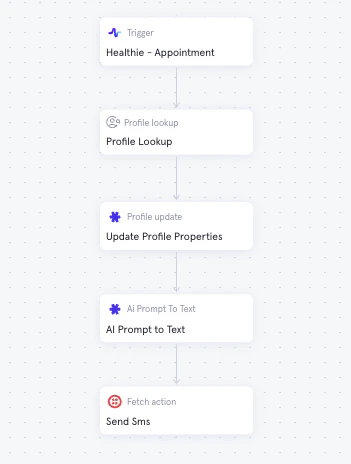
To begin using AI generated text in Morf:- Add the AI Prompt to Text node to your workflow when you want text generated.
- Give the node a descriptive object name (i.e.
appointment_summaryorconfirmation_text). You’ll use this object name when referencing the output in downstream nodes. - Map the Prompts parameter to an array. Add all prompts as static values in individual array entries. The number of prompts will not change the response format — one text string is generated per node.
- To use the AI generated text later in the workflow, reference the node’s
response(i.e.appointment_summary.response,confirmation_text.response).